
Release Notes - Lap v0.3.2
Lap v0.3.2 brings new ways to explore, import, and organize your photo library. Discover geotagged photos in Map View, play Google Motion Photos, import media into date-based folders, and clean up duplicates across the library. This release also adds sharper thumbnails for large displays, configurable RAW previews, and improvements to album handling and Linux compatibility.
🚀 Highlights
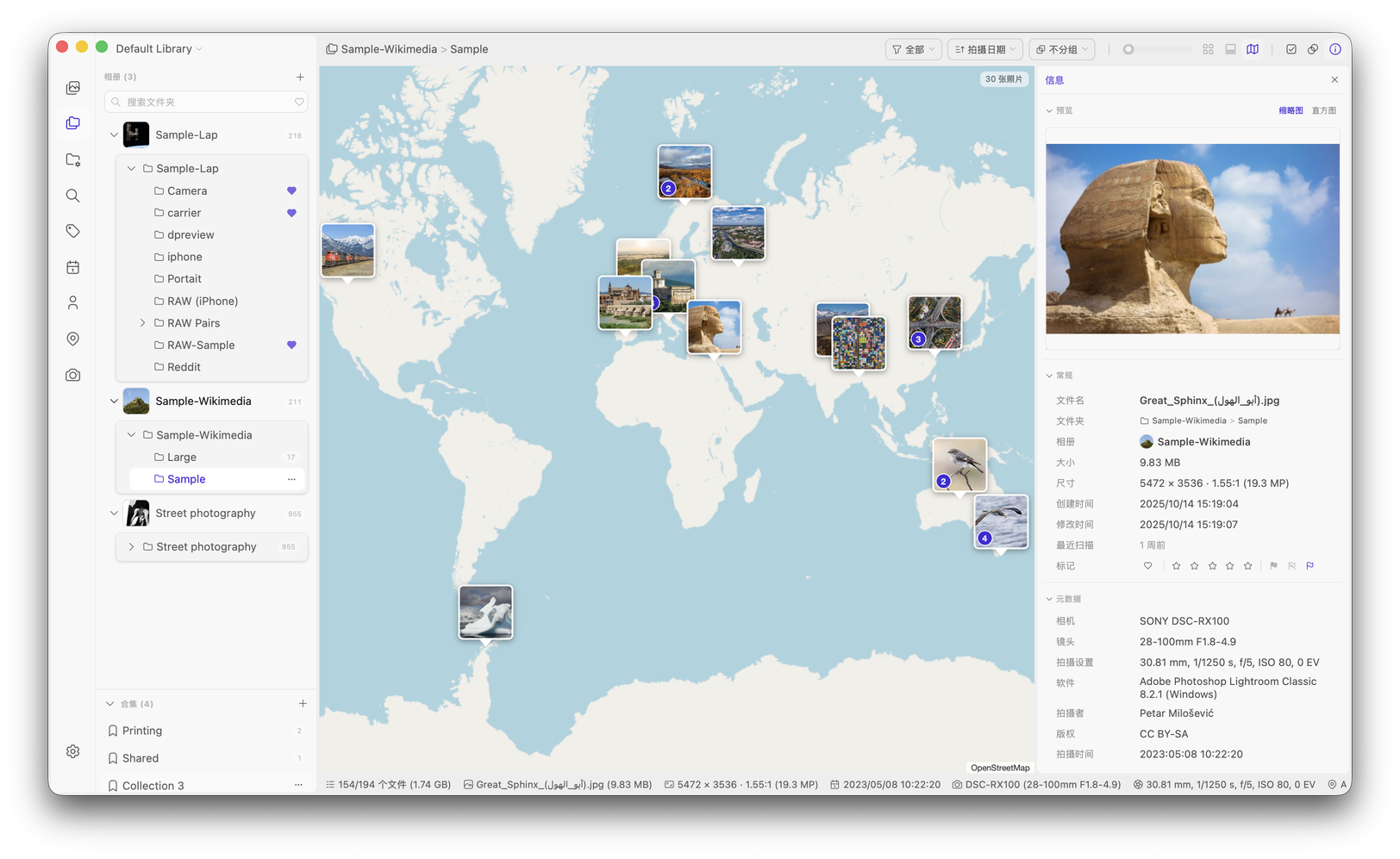
- Map View — Explore geotagged photos and videos on an interactive map that follows your current filters. Open a location cluster to browse its photos, then return without losing your map position or zoom. (#223)
- Google Motion Photos — Play the embedded video in supported Google/Android Motion Photo JPEGs. Existing libraries can recognize Motion Photos, and the Live & Motion Photos Smart Album condition brings them together with Apple Live Photos. (#18)
- Import and Organize by Date — Copy photos and videos into day, month, year, or single-folder layouts. Preserve filenames, skip duplicate content, and use progress, cancellation, and continuation controls. RAW files and Apple adjustment sidecars are supported. (#86)
- Library-Wide Duplicate Cleanup — Review reclaimable space and delete removable copies across all duplicate sets while preserving each set's keep choice. (#291)
- Sharper Thumbnails and RAW Previews — Choose thumbnail resolutions up to 1024 px and grid sizes up to 720 px. Use RAW rendering or the camera's embedded preview for consistent RAW thumbnails and previews. (#274, #275, #269)
✨ New Features and Improvements
- Added Tianditu as an optional map provider for China, configurable with your own API token.
- Added date-based import layouts including
YYYY/YYYY-MM-DD,YYYY/YYYY-MM, andYYYY, using capture dates with file modification dates as a fallback. Imported files appear without a separate full scan. (#86) - Added imported, skipped, and failed counts, with safeguards against identical or nested import source and destination folders.
- Added theme-defined or square thumbnail corners. (#74)
- Added a small-image filter with 160, 320, and 640 px thresholds. It hides files only when both dimensions fall below the threshold, keeping browsing counts consistent without excluding files from indexing. (#258)
- Removed the 1,000-result cap from visual/semantic search and the 10-result cap for regular text, filename, and metadata matches. Keyword photo search now consistently applies the selected similarity cutoff. (#279)
- Added automatic loading of more people when scrolling through the People list. (#279)
- Added a double-click choice between Quick Preview and a separate viewer window for photos and videos. (#281)
- Unified collection and tag editing, including removing selected photos from collections and creating, renaming, or deleting tags within the editing dialogs. (#283)
- Added desktop wallpaper selection on macOS, Windows, and GNOME Linux, including suitable companion images from RAW+JPEG pairs. (#292)
- Added Page Up and Page Down navigation. (#296)
- Restored Random sorting, with grouping disabled while it is active. (#303)
- Added hierarchical Calendar navigation with Years, Months, and Days tabs, localized month names, and counts at each level.
- Added Camera and Lens tabs with group counts, and kept sidebar counts visible beside the more menu.
- Added multiple external applications with a selectable default.
- Improved File Info with people avatars, album-cover indicators, clickable previews, and camera, lens, and location navigation. Empty fields are hidden.
- Added counterclockwise view rotation and video zooming around the cursor with constrained panning.
- Improved unavailable-album handling for removable and network storage, retaining cached folder trees and rechecking availability when accessed.
- Reworked subfolder refresh to update folder hierarchies without regenerating thumbnails or scanning all media.
- Added a welcome-screen language selector, persisted the left panel state, and reorganized Browse and Grid settings.
- Added AppImage update information and
.zsyncfiles for delta updates through compatible external tools such as AppImageUpdate and AppImageLauncher. (#284)
🐞 Bug Fixes
- Fixed missing iPhone video camera metadata, including make, model, and software stored in Apple QuickTime tags. (#221)
- Fixed multilingual model downloads failing on slow connections by increasing the connection timeout and showing clearer errors. (#272)
- Fixed duplicate, ghost, and unexpectedly cleared selections, preserving selection and panel state during refreshes. (#267)
- Fixed AppImage startup failures and blank windows caused by runtime conflicts on newer distributions, including reported Fedora 44 GNOME and Wayland cases. (#224, #270, #271)
- Fixed pure-Wayland startup while respecting an explicitly selected backend, and restored GStreamer plugin discovery for video and audio playback. (#271)
- Fixed reopening Settings without restarting Lap. (#285)
- Fixed excessive thumbnail blur for very wide or tall images. (#286)
- Fixed explicitly selected album roots being skipped because of hidden attributes, including Windows NTFS drive roots. (#288)
- Fixed the file-import overlay remaining visible after internal drag-and-drop operations. (#289)
- Fixed stale album covers and prevented overlapping album folders that could cause synchronization conflicts. (#247)
- Fixed stale collection badges and membership after removals or collection deletion.
- Reduced redundant sidebar and Smart Album reloads and fixed thumbnail flicker during scanning.
- Fixed empty filmstrip layouts and stopped slideshows when leaving filmstrip mode or entering Map View.
- Fixed rename dialogs reopening during keyboard navigation and improved close-button and confirmation behavior. (#296, #268)
- Fixed repeated duplicate-deletion submissions and deletion handling for unloaded items in large result lists.
- Fixed unreadable images leaving People indexing incomplete and corrected Windows COM initialization error handling.
📦 Downloads and Updates
Download the matching macOS, Windows, Linux DEB, or AppImage package from the v0.3.2 release. See Getting Started for installation and update guidance.
For AppImage installations, download the new AppImage instead of using the built-in updater. The embedded update information and .zsync files support future delta updates through compatible external tools.
🙌 Thanks
Thanks to everyone who reported issues, suggested improvements, and tested development builds, especially those who helped investigate RAW previews, Motion Photos, and Linux Wayland compatibility.
Thank you for using Lap!