
Release Notes - Lap v0.3.3
Lap v0.3.3 adds Photo Collage, tag groups, offline album browsing, and arbitrary-angle straightening. It also brings more RAW preview controls, faster startup and RAW browsing, simpler view switching and multi-select, and six new languages.
🚀 Highlights
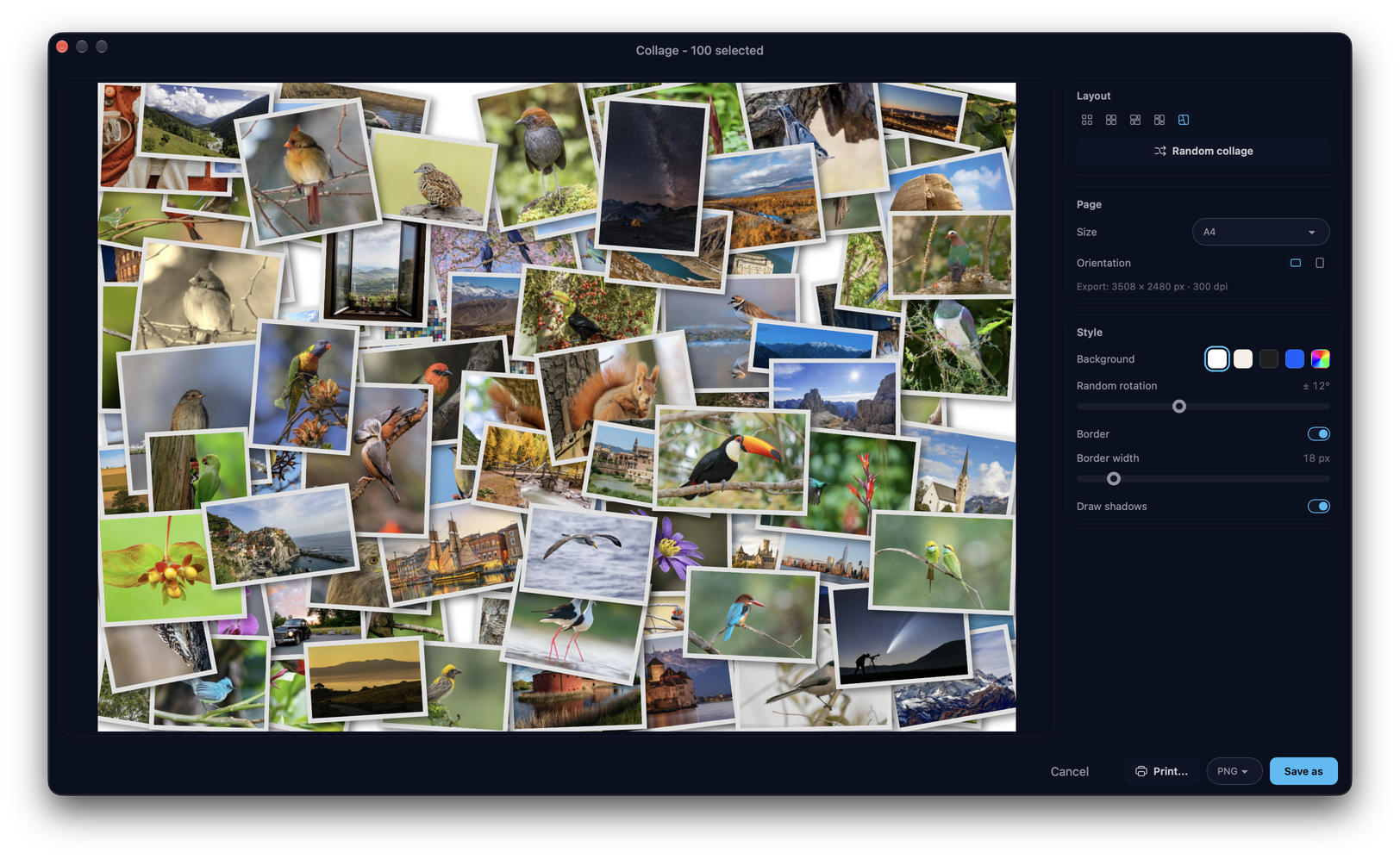
- Photo Collage — Compose selected photos into a single shareable image with grid, justified-mosaic, and Picasa-style picture-pile layouts. Move, layer, rotate, and scale photos on the pile, randomize a layout, then export at full resolution from the originals or print to A4 or photo paper at 300 dpi, with customizable page size, orientation, background, spacing, borders, and optional drop shadows. (#358, #387)
- Tag Groups — Organize tags into collapsible, reorderable groups with inline editors for creating tags and groups, move tags between groups, and show the group name in content titles. A protected Default group keeps every tag categorized. (#304)
- Offline Album Browsing — Albums on disconnected or network storage stay visible across the library with a warning indicator, so you can browse cached thumbnails and metadata without the volumes mounted. Actions that need the original file are clearly gated. (#351)
- Arbitrary-Angle Straighten — Fine-tune horizons in crop mode with a ruler slider that snaps to zero, supports keyboard stepping, and live-previews the straightened, cropped result before saving. (#318)
- RAW Preview Controls — Choose the preview source (rendered or embedded), adjust render brightness, and control RAW+JPEG pair display, and switch between RAW modes and the paired JPEG/HEIC directly in the viewer. (#331, #369)
- Six New Languages — Lap is now available in Hungarian, Italian, Dutch, Polish, Ukrainian, and Traditional Chinese, bringing the total to fifteen languages. (#330, #336, #343, #364)
✨ New Features and Improvements
- Added native file drag-out: drag photos and videos from the grid or the viewer straight into Finder, Explorer, or other apps as real files, with a thumbnail drag preview and support for up to 1,000 files at once. (#339)
- Added a thumbnail navigator to the File Info preview, showing the whole image with a draggable viewport box for quick navigation, scroll-to-zoom, double-click to fit, and rotation-aware positioning.
- Added in-view sorting and sidebar search, letting you reorder and filter results without leaving the current view. (#396)
- Unified grid, filmstrip, and map into mutually exclusive view modes with a single switch. (#315)
- Added configurable map photo marker size, and improved map clustering and transitions. (#307)
- Added per-album exclusions with a scan preview, replacing the global small-image filter with per-album file-type, small-image, and folder exclusions. (#322, #332)
- Added importing files directly into an album folder, respecting the album's exclusions and scan safety.
- Added "Refresh file info" for multi-selections to re-read metadata for several files at once. (#368)
- The image viewer now bidirectionally syncs the current photo with the main-window selection. (#328)
- Added per-library thumbnail cache cleanup in Manage Libraries, with cache sizes shown per library.
- Main-window dialog positions are now remembered across sessions.
- Added an optional navigator sharpness grid to compare focus across shots.
- Consolidated multi-select actions into the selection panel and removed the separate thumbnail double-click action setting. (#347)
- Reworked multi-select so the mode is independent of the selection panel: selecting no longer forces the panel open, and a floating count button opens it on demand, showing the selected count and total size alongside up to 15 selected thumbnails. (#407)
- Added an optional build against the system libheif (
LAP_SYSTEM_LIBHEIF=1) for distribution packaging. (#359) - Improved management dialogs, folder actions, and the shared splitter indicator with a delayed hover fade-in.
- Date and time now format according to the system region by default, independent of the UI language. (#390)
- Bundled third-party license notices with the app for easier attribution and compliance.
- Faster startup: heavy background work is deferred until after the first content paints, and languages and sidebar views are now lazy-loaded.
- Faster RAW browsing with reduced-resolution previews and on-demand full-size rendering when zooming in. Distinct icons identify embedded, rendered, and brightened RAW previews.
- Collage page, layout, and style preferences now persist between sessions. Image editor preferences now sync between windows. (#358)
🐞 Bug Fixes
- Aligned video capture times with photos so images and videos from the same shoot sort together correctly. (#400)
- Fixed rotated NEF previews by matching embedded JPEG previews by long/short edge, and extracted embedded JPEGs independently of the RAW decoder. (#360, #361)
- Resolved the HEIF primary image for tiled-grid thumbnails and sizes, and added a robust HEIF decode fallback on Windows and Linux using FFmpeg with a format sniffer. (#349, #355)
- Fixed HEIC decoding on macOS by falling back to native ImageIO. (#321)
- Fixed grouped JPEG previews not fitting their geometry grid cells. (#398)
- Fixed the full image being replaced by the thumbnail when navigating quickly. (#367)
- Centered small RAW previews using explicit layout dimensions, and preserved the RAW preview mode across source changes.
- Restored RAW preview fallbacks: try rendering when an embedded preview is unavailable, and try the embedded preview when rendering fails. If neither works, attempt general image decoding, including JPEG content saved with a RAW extension.
- Fixed RAW+JPEG/HEIC badge highlighting and made switching from the paired image select the current RAW mode before cycling modes. Removed the default focus outline from RAW preview badges on Windows.
- Fixed Live Photo previews not restarting, and made fullscreen backgrounds opaque. (#347)
- Guarded video hover previews against a missing GStreamer sink. (#313)
- Detect database corruption per library and prompt you to switch libraries, preserving the original database file instead of silently rebuilding it. (#326)
- Made database storage migration safe, reporting cleanup failures rather than losing data. (#354)
- Fixed a crash on exit when Aptabase analytics is not enabled. (#372)
- Reloaded visible thumbnails after deletion in grouped view. (#325)
- Fixed inline rename losing focus and Enter unexpectedly opening the dialog.
- Refreshed the current album view after changing exclusions and avoided duplicate default names when creating tags.
- Stopped thumbnail drag from File Info previews and simplified album and preview fields.
- Tracked the satellite map theme separately for the map view and the info panel.
- Showed a duplicate-name warning on drag and drop. (#386)
- Clarified paired files in album scan status. (#392)
- Persisted the preview toolbar pinned position.
- Fixed Windows builds by compiling libde265 at
/O1on MSVC. (#389, #393) - Excluded bundled libsystemd and libudev from the AppImage to fix runtime conflicts. (#311)
- Refreshed file info in place without resetting the viewport or scroll position.
- Restored grouping when returning from filmstrip view.
- Stopped "Refresh file info" from downloading unchanged cloud-only files (OneDrive Files On-Demand and macOS dataless files) by detecting them from metadata instead of opening them. (#394, #411)
📦 Downloads and Updates
Download the matching macOS, Windows, Linux DEB, or AppImage package from the v0.3.3 release. Added release-triggered Fedora builds in the community COPR repository. Packages may become available later than the main release downloads. (#370) See Getting Started for installation and update guidance.
For AppImage installations, download the new AppImage instead of using the built-in updater. The embedded update information and .zsync files support delta updates through compatible external tools such as AppImageUpdate and AppImageLauncher.
🙌 Contributors
This release includes community contributions across features, platform fixes, and translations. Many thanks to:
- ddcdk — the Photo Collage studio (grid, justified-mosaic, and picture-pile layouts) (#358, #387), the cloud-only file refresh fixes (#394, #411), and the MSVC libde265
/O1Windows build fix (#389, #393). - beneedict — the Fedora COPR release build (#370) and the optional system-libheif build flag (
LAP_SYSTEM_LIBHEIF=1) (#359). - yi111 — the robust HEIF decode fallback on Windows and Linux using FFmpeg with a format sniffer (#349, #355).
- Daniel Benner — keeping the full image from being replaced by its thumbnail when navigating quickly (#367).
- Philip de Bruin — fixing the crash on exit when Aptabase analytics is not enabled (#372).
- Tomasz Gospodarczyk — the Polish locale and README translation (#343).
- OPGERUIMD97 — the Dutch translation (#364).
- Dmitry Yerokhin — Russian translation updates (#320).
- bakos-andras — the Hungarian translation (#330).
And thanks to everyone who reported issues and tested development builds.
Thank you for using Lap!